
 LOADING...
As a software developer, you often build features and modules that interact directly with users. While developing these systems, it's easy to focus on functionality and overlook important security precautions. However, even a small security mistake can become a serious problem when your application serves a large number of users.
If a website is not designed with security in mind, attackers may exploit its vulnerabilities and compromise user data, sessions, or accounts. One of the most common web security vulnerabilities is Cross-Site Scripting (XSS).
In this article, we'll explore what XSS is, how attackers use it to target websites, the potential impact it can have on users and organizations, and the practical steps developers can take to prevent it. Rather than focusing only on theory, we'll look at real-world scenarios and practical examples that help you understand the vulnerability from a developer's perspective.
Whether you're a beginner or an experienced web developer, understanding XSS is essential for building secure web applications. Let's get started.
In This Article
- What is Cross-Site Scripting (XSS)?
- Why is XSS a Serious Security Vulnerability?
- Types of XSS Attacks
1. Stored XSS
2. Reflected XSS
3. DOM-Based XSS - How an XSS Attack Works
- Real-World Impact of XSS
- XSS Attack Demonstration
- Prevention Techniques and Best Practices
- How Modern Frameworks Handle XSS
- Final Thoughts
1. What is Cross-Site Scripting (XSS)?
Cross-Site Scripting (XSS) is one of the most common security vulnerabilities found in web applications. Instead of attacking the server directly, attackers target the users of a website by injecting malicious JavaScript code that runs inside their browsers.
As the name suggests, XSS involves injecting scripts into a trusted website. When a vulnerable application fails to properly handle user input, an attacker can insert malicious code that gets executed when another user visits the affected page.
One of the reasons XSS is dangerous is that the attack happens on the client side (the browser), not on the server. Because of this, traditional server logs often do not reveal what happened, making such vulnerabilities harder to detect and investigate.
Since JavaScript has access to many parts of a web page, an attacker can use XSS to perform a variety of malicious actions. For example, they may:
- Steal sensitive user information.
- Capture login credentials.
- Read data stored in localStorage or sessionStorage.
- Hijack user sessions.
- Modify page content.
- Perform actions on behalf of the victim without their knowledge.
If an attacker gains access to authentication tokens or session-related information, they may be able to access a user's account remotely and impersonate them.
The good news is that XSS vulnerabilities are preventable. By validating user input, sanitizing untrusted data, and following secure development practices, developers can significantly reduce the risk of such attacks. In the following sections, we'll explore how XSS works, its different types, and the techniques you can use to protect your applications.
2. Why is XSS a Serious Security Vulnerability?
XSS is dangerous because the malicious script runs inside the victim's browser, under the identity of a trusted website. The browser cannot easily distinguish between the website's legitimate JavaScript and the attacker's injected script.
✧ Consequences
Once the malicious script starts running, it works silently in the user's browser without them knowing. It can affect many users at the same time, steal information that JavaScript can access, and even perform actions on behalf of the user. In serious cases, it can lead to account takeover and compromise sensitive data.
✧ What attackers may do ?
If they successfully find the way to execute this attack they will first try to steal the authentication token or session data. They may perform actions on behalf of logged in user and even can modified the website content. If they fails to get session data they can provide vulnerable links to users via email for in comments section so that they can easily steal user credentials.
Though todays site building process is more secure and reliable but still hackers always try to penetrate sites and find possible vulnerabilities, that can damage websites's reputation and possibly user base. Therefore taking possible measures are important.
✧ What you should care?
A small mistake, such as rendering untrusted user input without escaping or sanitizing it, can put thousands of users at risk. That's why XSS is considered one of the most important vulnerabilities every web developer should understand.
3. Types of XSS Attacks
There are three common types of XSS attacks that attackers use to exploit vulnerable websites:
- Stored XSS
- Reflected XSS
- DOM-Based XSS
I know these names don't tell you much about how the attacks actually work. Don't worry, we'll understand each type with simple explanations and practical examples in the next sections.
Note
This article is written to help web developers understand XSS vulnerabilities and build more secure applications. The examples shown here are for learning purposes only. Never try to test or exploit vulnerabilities on websites that you do not own. If you want to perform security testing on someone else's application, always get permission from the owner first. The safest approach is to practice on your own projects or a local development environment.
Now let's start with the first and most common type of XSS attack: Stored XSS.
1. Stored Cross-Site Scripting (Stored XSS)
Stored XSS is the most common and dangerous type of XSS attack.
Most modern websites display content that is stored in a database. For example, an e-commerce website loads product information from a database, a social media platform loads posts and comments, and a blogging website loads articles written by users. In short, websites constantly fetch data from databases and render it on web pages.
Features that allow users to submit content, such as comments, reviews, profiles, forum posts, or articles that can become entry points for attackers if user input is not handled properly.
Let's take a simple example of a website with a comment system.
Suppose an attacker submits a comment containing malicious JavaScript code. If the application stores that comment in the database without proper validation or sanitization, the malicious script gets saved along with the comment. Since the script is stored permanently in the database, this vulnerability is known as Stored XSS.
Later, when other users visit the page and load those comments, the malicious script is delivered to their browsers and executed automatically. The victims do not need to click anything or perform any action, the attack runs simply because they viewed the page.
As a result, the attacker may be able to steal sensitive information, hijack user sessions, or perform actions on behalf of affected users. Since the malicious code is stored in the application itself, a single attack can potentially impact many users who visit the page.
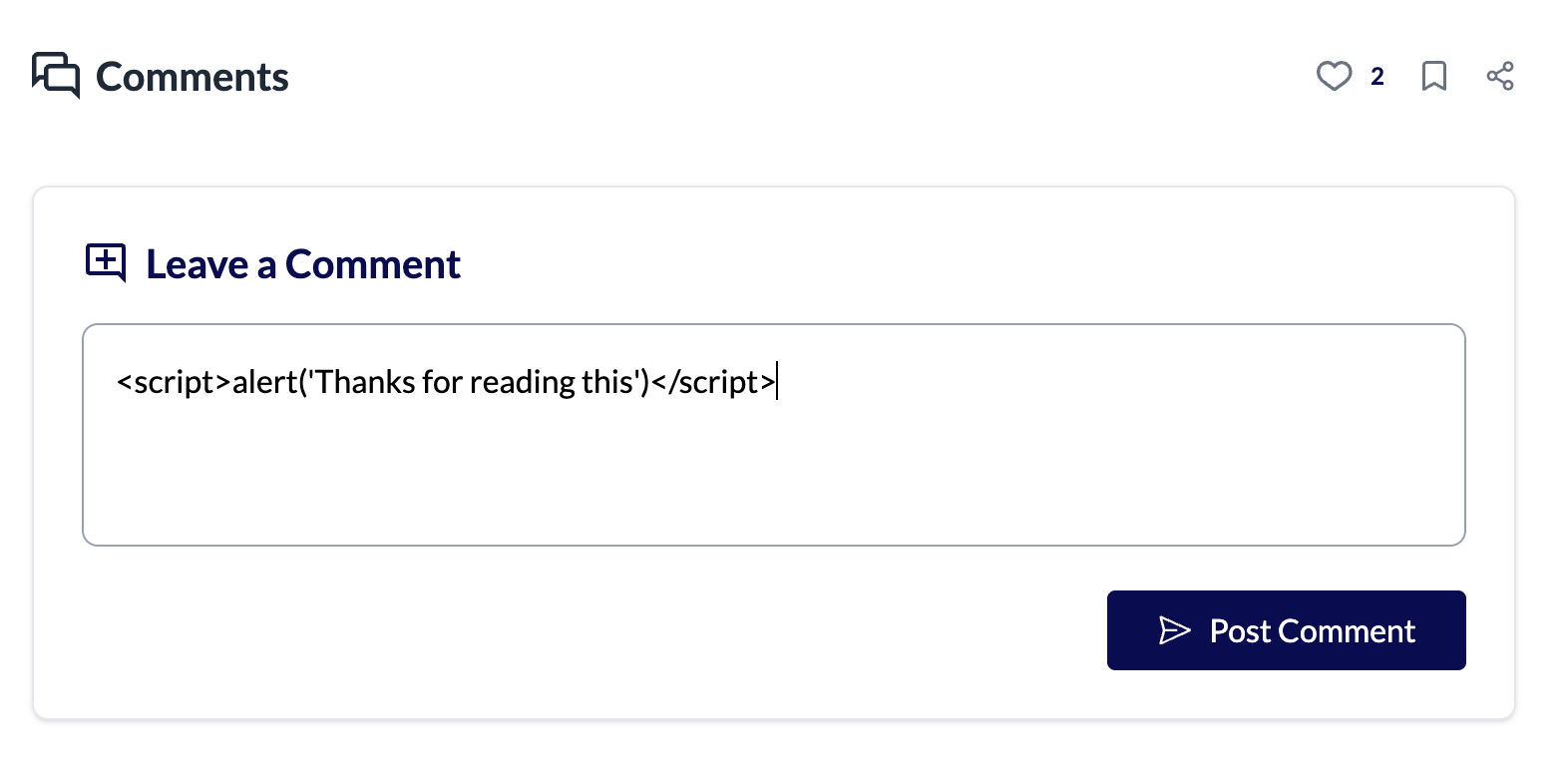
If your application does not properly escape or sanitize user input, the browser may treat the injected content as valid HTML or JavaScript and execute it. In many cases, attackers start with a simple payload such as an alert() dialog to verify whether an XSS vulnerability exists.
An unexpected alert() popup is usually harmless and serves only as a proof of concept. However, if the script executes successfully, it confirms that the application is vulnerable. An attacker can then replace the harmless code with more dangerous scripts designed to steal sensitive information, hijack user sessions, or perform actions on behalf of other users.
This is why even a simple popup should never be ignored during development, it may be the first sign of a much more serious security issue.
✧ How to protect your site from this attack ?
1. Escape HTML Characters
What does escaping html Characters means?
The browser displays the user's input as plain text instead of treating it as HTML or JavaScript.
One of the simplest and most effective ways to prevent XSS is to ensure that user input is treated as plain text, not HTML.
This is done by replacing special HTML characters with their corresponding HTML entities. For example, the < character is converted to <. The browser still displays it as <, but it no longer treats it as the start of an HTML tag. As a result, any injected HTML or JavaScript is displayed as text instead of being executed.
If you've worked with modern frameworks like React or Angular, you've probably noticed that they escape user input by default. This built-in protection helps prevent many common XSS vulnerabilities. However, if your application needs to render user-provided HTML, you should always sanitize it first. Libraries such as DOMPurify are commonly used for this purpose.
Modern frameworks provide strong security features, but they are not a replacement for secure coding practices. Always validate user input, escape untrusted content, and sanitize HTML whenever necessary. A small security precaution during development can prevent a serious vulnerability in production.
✧ Example
 <script>
       {` ${alert('hello')} `}  // here attckers can place malicious code
 </script>
If your application renders user input as executable code in the browser, an attacker can replace a harmless example like this with malicious JavaScript. Once the code is stored or displayed on the page, it may execute automatically whenever another user visits that page.
That's why features like comments, reviews, profile descriptions, forums, and articles require extra attention. Since these sections are viewed by many users, a single XSS vulnerability can affect everyone who visits them.
Whenever you build such modules, never render raw user input directly. Always escape or sanitize the data before displaying it on the page. A small security check can prevent a serious XSS vulnerability.
✧ Implement a Content Security Policy (CSP)
XSS attacks rely on executing JavaScript in the browser. If you can prevent malicious scripts from running, your website becomes much more secure for your users.
Attackers often try to inject a tag or other inline JavaScript into a web page. Modern browsers allow websites to define a Content Security Policy (CSP), which helps control how JavaScript is executed.
By configuring a Content Security Policy, you can instruct the browser not to execute inline JavaScript. Instead, the browser will only execute JavaScript that is loaded through the src attribute of a <script> tag. For example, you can specify that scripts are allowed only from your own domain ('self') or trusted domains such as apis.google.com, while blocking all inline JavaScript.
A typical content security policy header will look like:
Content-Security-Policy: script-src 'self' https://apis.google.comIn Detail. -
Content-Security-Policy: default-src 'self'; script-src 'self' https://trustedscripts.com; style-src 'self' 'unsafe-inline'; img-src *;1. default-src 'self' - By default, the browser loads resources only from the same origin (your own website).
2. script-src 'self' https://trustedscripts.com - JavaScript can be loaded only from your own domain and the trusted domain
3. https://trustedscripts.com - Scripts from any other source are blocked.
4. style-src 'self' 'unsafe-inline' - CSS files can be loaded from your own website. The unsafe-inline keyword also allows inline styles (such as the style attribute or tags). Although sometimes required, it's generally recommended to avoid unsafe-inline whenever possible.
5. img-src * - Images are allowed to load from any domain.
This policy tells the browser exactly which sources are trusted for loading different types of resources. If an attacker tries to inject a script from an untrusted domain, the browser blocks it, making XSS attacks much harder to exploit.
You can also define a Content Security Policy using a <meta> tag inside the <head> section of your HTML. Here, you specify the domains from which JavaScript is allowed to load. By doing this, you instruct the browser to trust scripts only from those domains, while blocking inline JavaScript.
<meta http-equiv="Content-Security-Policy" content="script-src 'self' https://apis.google.com">In the above example, the browser will load JavaScript only from your own website ('self') and the trusted domain apis.google.com. Any JavaScript from other sources will be blocked. If you want to allow inline JavaScript, you would have to explicitly include the unsafe-inline keyword in your Content Security Policy.
Using a Content Security Policy is a good security practice because it discourages the use of inline JavaScript. Instead, keep your JavaScript in separate files and load them using the src attribute of the <script> tag. This not only makes your application more secure but also keeps your code cleaner and easier to maintain.
If your application already contains many inline scripts, refactoring them all at once may not be practical, especially in large or complex projects. Depending on the size of your application, moving all inline JavaScript to separate files can take considerable time.
In such cases, you can use Content-Security-Policy-Report-Only. Instead of blocking inline JavaScript immediately, the browser reports every policy violation while allowing the page to continue working. This lets you identify the areas of your application that need to be updated before enforcing the policy.
Content-Security-Policy-Report-Only: script-src 'self'; report-uri https://example.com/csp-reportsWith the report-uri directive, the browser sends a report whenever it detects a Content Security Policy violation, rather than blocking the script. By collecting these reports, your team can identify all the pages that still rely on inline JavaScript and gradually refactor them to comply with your Content Security Policy.
2. Reflected Cross-Site Scripting (Reflected XSS)
Storing malicious scripts in the database isn't the only way to perform an XSS attack. Another common technique is Reflected Cross-Site Scripting (Reflected XSS).
Many websites use values from the HTTP request, such as URL query parameters, to display dynamic content on a page. For example, search pages often display the user's search term.
https://example.com/search?q=textHere, text is the search query sent in the URL. If the application displays this value on the page without properly escaping or sanitizing it, an attacker can replace it with malicious JavaScript. When someone opens the crafted URL, the application reflects the malicious input back into the page, and the browser may execute it.
Unlike Stored XSS, the malicious script is not saved in the database. Instead, it exists only in the request and is immediately reflected in the response, which is why this attack is called Reflected XSS.
To make the attack successful, the attacker usually tricks the victim into opening the malicious URL. This link may be shared through email, social media, messaging apps, or even posted in comments on public platforms. Since the URL belongs to a trusted website, users are more likely to click it without suspecting anything.
Although the attack method is different, the attacker's goal remains the same i.e. to execute malicious JavaScript in the victim's browser and compromise their data or session.
✧ How to Protect Your Site from Reflected XSS?
1. Avoid Rendering Untrusted Data from HTTP Requests
You can prevent Reflected XSS in much the same way as Stored XSS, by escaping or sanitizing any dynamic content before rendering it in HTML. It doesn't matter whether the data comes from the database or directly from an HTTP request; if it's displayed on the page, it should always be treated as untrusted.
In most applications, developers don't directly insert query parameters into the DOM. However, it's still important to be aware of this risk. Search pages, error pages (such as 404 - Page Not Found), and other pages that display values from the URL are common targets for Reflected XSS attacks.
For example, imagine you're logged in to webredo.net, and your authentication token is stored in the browser's localStorage. An attacker sends you a URL that looks legitimate but contains malicious JavaScript in one of its query parameters.
https://webredo.net/article/article-name?...Since the URL belongs to a trusted website, you may click it without thinking twice. If the website renders that query parameter directly into the page without escaping it, the malicious script could execute in your browser. The attacker might then steal your authentication token from localStorage and use it to access your account.
A more common example is a search page. Many websites display messages like:
You searched for: Mobile menu
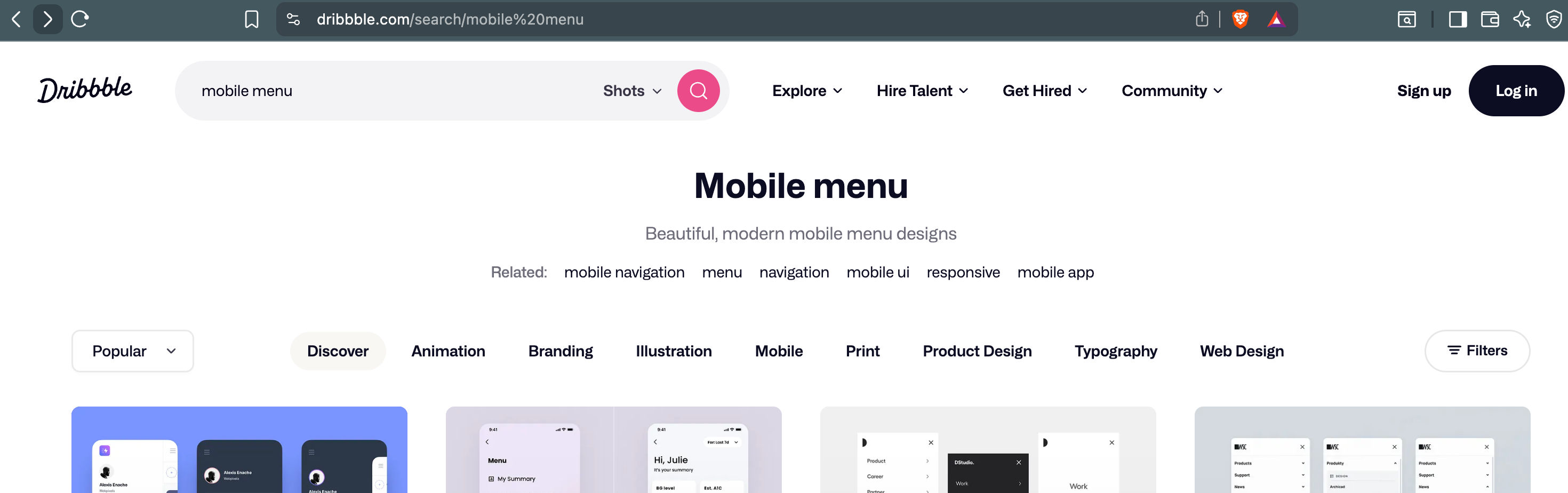
The highlighted text comes directly from the search query in the URL. If the application doesn't escape that value before rendering it, an attacker could replace it with malicious code. That's why data coming from URL parameters should never be trusted.
The good news is that most modern template engines, such as EJS and Pug, automatically escape interpolated variables by default. Similarly, frameworks like React and Next.js escape user input when rendering components, making Reflected XSS much harder to exploit. Even so, developers should avoid rendering untrusted URL parameters as raw HTML.
3. DOM-Based Cross-Site Scripting (DOM-Based XSS)
Nowadays, most web applications are built using modern frameworks like React, Angular, or Vue. These frameworks provide strong built-in protection against common XSS vulnerabilities. However, no framework can completely protect an application if developers use unsafe coding practices.
DOM-Based XSS is different from the other two types of XSS because the attack happens entirely inside the browser. The server is not involved. Instead, the attacker tries to inject malicious JavaScript through data that client-side JavaScript reads and writes to the DOM.
To understand this attack, you first need to know about the URI fragment.
https://example.com/articles?ref=google#detailsEverything after the # symbol is called the URI fragment. Unlike query parameters, this part of the URL is never sent to the server. It is processed only by the browser.
Browsers commonly use URI fragments for in-page navigation. For example, when you open a link that automatically scrolls to a specific section of a page, it uses the fragment to locate an element with the matching id.
For example:
https://en.wikipedia.org/wiki/Dog#SensesThis URL automatically scrolls to the Senses section because the page contains an element similar to:
<h3 id="Senses">Senses</h3>This built-in browser feature is extremely useful and is widely used by websites.
In modern Single Page Applications (SPAs), the browser also uses URL fragments and other client-side mechanisms to maintain navigation state without reloading the entire page. Features such as deep linking, client-side routing, and restoring scroll positions often rely on information stored entirely in the browser.
You may have also noticed this behavior on websites like Pexels or Pixabay. As you keep scrolling, new images are loaded continuously. If you refresh the page, you're often returned to the same position instead of starting from the top. This is achieved using browser-side techniques such as URL state, browser history, or temporary storage like sessionStorage or localStorage, depending on how the application is implemented.
There's a lot happening behind the scenes to make this experience smooth, but that's outside the scope of this article. The important takeaway is that much of this logic runs entirely in the browser without involving the server.
The important thing to understand is that all of this happens on the client side. Since the server never sees the URI fragment, server-side validation cannot protect against malicious data placed there. If your JavaScript reads values from the URL fragment and inserts them into the DOM without proper validation or escaping, it can lead to a DOM-Based XSS vulnerability.
✧ How to protect your site from this attack ?
1. Break out Dynamic Content from URI Fragments
To protect your site from this attack it is important to check the part taken from URI fragment is not including directly inside HTML DOM. Before it should be validated before use so that malicious script wont be executed in through this technique anyway.
Modern frameworks has better protection in such case like in React.js we use brackets "{ }" for dynamic values which itself doesn't allow execution of scripts inside. dynamic html or script will be consider as scripts thats why in case of you want to use dynamic html (like in blogging website) then you have to use dangerouslySetInnerHTML React.js feature which is use to inject raw HTML strings directly into your React components.
4. How an XSS Attack Works
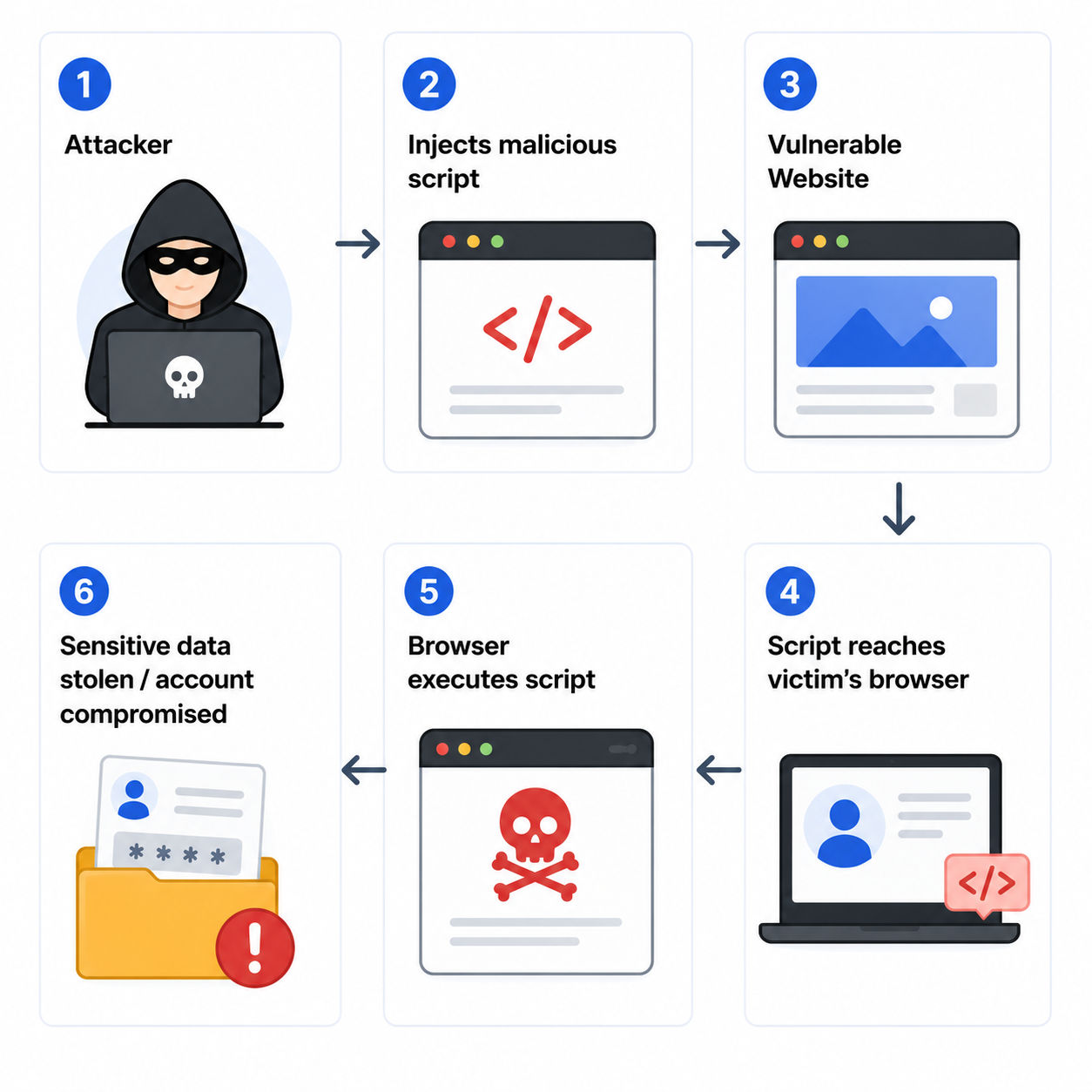
An XSS attack usually begins when an attacker discovers a vulnerable part of a website, such as a comment section, search box, profile description, or any other feature that accepts user input. The attacker injects malicious JavaScript into that input, and if the application doesn't properly escape or sanitize it, the code becomes part of the web page.
Later, when another user visits the affected page, their browser trusts the website and executes the injected script. From there, the attacker may be able to steal authentication tokens, access sensitive user data, modify the page, or perform actions on behalf of the logged-in user. Once the information is collected, the attacker can misuse the victim's account.
As we've discussed throughout this article, the attacker's main goal is to find an entry point where malicious JavaScript can be injected. It doesn't matter whether the vulnerability is Stored XSS, Reflected XSS, or DOM-Based XSS, once they find a weak spot, they can attempt to exploit it.
Not everyone who discovers a vulnerability has malicious intentions, though. During one of my previous projects, a security researcher responsibly reported a high-severity XSS vulnerability to our team instead of exploiting it. This gave us the opportunity to fix the issue before it could affect users.
This is known as responsible disclosure and plays an important role in improving the security of web applications. It reminds us that security isn't just about defending against attackers, it's also about learning from those who help identify vulnerabilities before they become real threats.
5. Real-World Impact of XSS
In real world scenario this cyber attack can be harmful for both users as well as organization in various ways.
How users get impacted ?
once attackers find possible vulnerability on site then few things becomes possible for them to attack target audience like -
- They might steal your login details
- Your session could be taken over by someone else
- An unauthorized person might access your account.
- our personal information could be exposed.
- Someone might perform fraudulent actions using your account.
and for organizational level few things are possible like
- There could be a data breach.
- You might lose the trust of your users.
- You could face financial losses.
- There may be legal and compliance issues to deal with.
- Your organization’s reputation could be damaged.
Imagine an attacker injects a malicious script into the comment section of a popular blog. Every user who visits that page unknowingly executes the script in their browser. If the script is designed to steal authentication tokens, hundreds or even thousands of user accounts could be compromised before the vulnerability is discovered.
XSS is much more than an annoying popup. A successful attack can lead to account takeovers, data theft, unauthorized actions, and serious damage to an organization's reputation.
That's why protecting your website from XSS is so important. It not only keeps your users safe but also protects your application's trust and credibility.
The good news is that modern frameworks such as React, Angular, and Vue provide built-in protections against many common XSS vulnerabilities. However, these protections are not a substitute for secure coding practices. As a developer, you should still validate user input, escape or sanitize untrusted content, and follow security best practices to keep your application secure.
6. XSS Attack Demonstration
For demonstration lets create one plain javascript comment form which takes input and show comments as output.
index.html
<body>
    <form onsubmit="handleSubmit(event)">
        <input type="text" name="name" placeholder="Enter Your Name">
        <input type="text" name="comment" placeholder="Add Your Comment">
        <button type="submit">Submit</button>
        <a href="" onclick="removeComments()">remove comments</a>
    </form>
    <div id="comments"></div>
    <script src="/index.js"></script>
</body>
index.js
// submit form
function handleSubmit(event) {
    event.preventDefault();
    const form = event.target;
    const name = form.name.value;
    const comment = form.comment.value;
    if(!name || !comment) return;
    const data = JSON.parse(sessionStorage.getItem('comments') || '[]');
    data.push({
        name,
        comment
    });
    sessionStorage.setItem('comments', JSON.stringify(data));
    form.reset();
    setComments();
}
As you see in above demonstration script is not getting executed as modern browsers usually block execution of dynamically inserted elements. This does not mean the application is safe from XSS. Attackers can still abuse other HTML elements and event handlers if user input is rendered without proper sanitization.
Lets try another approach
<img src="invalid-image" onerror="alert('XSS Attack Demonstration')">Here the browser may execute the onerror handler when the image fails to load. as you can see there is alert on loading comments, that means this attack is working.
You can try other types by creating simple html-js application or you can also test in your running project to make sure its secure for these attacks.
7. Prevention Techniques and Best Practices
To protect your website from XSS attacks, you should follow a few basic security practices during development. These simple precautions can greatly reduce the chances of your application becoming vulnerable to malicious script injection.
1. Never trust user input
As a web developer, you should never assume that user input is safe. Any data submitted by users should be treated as untrusted, whether it comes from a comment form, profile page, contact form, search box, or any other feature.
Always validate and sanitize user input on both the client and the server before storing it in the database or rendering it on the page. Following this practice greatly reduces the risk of XSS vulnerabilities and helps make your application more secure and reliable for your users.
2. Escape Output
As we discussed in the Stored XSS section, always escape special HTML characters such as <, >, ", and ' before rendering user input on the page. This converts them into HTML entities, so the browser displays them as plain text instead of interpreting them as HTML or JavaScript.
By escaping output, even if an attacker submits a malicious script, it will be displayed as text rather than executed in the user's browser.
3. Sanitize HTML
If your application includes features such as comments, public profiles, blogs, forums, or any other user-generated content, always sanitize the input before rendering it in the HTML DOM.
Sanitizing removes or filters out potentially dangerous HTML and JavaScript while allowing safe content to be displayed. This adds an extra layer of protection and helps prevent malicious code from being executed in the user's browser.
4. Avoid innerHtml
Many developers use innerHTML without thinking about its security risks. If you pass user input directly to innerHTML, the browser treats it as HTML. This means malicious code could also be executed.
If you only want to display text, use textContent instead. It displays the content as plain text, so any HTML or JavaScript is shown as text rather than being executed.
// Slightly insecure
element.innerHTML = userInput;

// More secure
element.textContent = userInput;  //or

document.createTextNode(userInput);
5. Use Framework Protection
Modern frameworks like React, Angular, and Vue provide built-in protection against many common XSS attacks. They automatically escape user input before rendering it on the page.
In simple terms, this means the browser displays the user's input as plain text instead of treating it as
HTML or JavaScript. As a result, even if someone submits a malicious script, it is displayed as text rather than being executed.
Although these frameworks provide strong protection, you should still follow secure coding practices and avoid rendering untrusted HTML directly.
For example if user pass this as input
<script>alert("XSS")</script>Then React automatically content this into
<script>alert("XSS")</script>The browser understands these HTML entities and displays them as the original characters. However, it treats them as plain text instead of HTML, preventing any embedded JavaScript from being executed, even when the content is rendered inside the HTML DOM.
6. Use Content Security Policy (CSP)
As discussed earlier in the Stored XSS section, you can define a Content Security Policy (CSP) to specify which sources are allowed to load JavaScript on your website. This tells the browser to execute scripts only from trusted sources and block unauthorized ones.
CSP adds an extra layer of protection against XSS attacks and helps reduce the impact of malicious script injection.
Example -
Content-Security-Policy: script-src 'self' https://apis.google.com

// html
<meta http-equiv="Content-Security-Policy" content="script-src 'self' https://apis.google.com">
7. Secure Cookies
Storing sensitive information in HTTP cookies is generally more secure than storing it in browser storage such as localStorage, especially when cookies are configured with security flags like HttpOnly, Secure, and SameSite.
I've written a detailed article explaining how HTTP cookies work and how to use them securely. You can read it here:
https://webredo.net/article/http-cookies-explained
It explains how secure cookies can help protect your application from attacks such as XSS and session hijacking.
Simple Node.js Example -
app.get('/set-cookie', (req, res) => {
    res.cookie('username', 'JohnDoe', {
        maxAge: 900000,
        httpOnly: true,
        secure: true,
        sameSite: 'lax'
    });
    res.send('Cookie has been set successfully!');
});

// You can keep this cookies generation part in auth process.
Think of secure cookies like special locks for your online session.
- HttpOnly: This lock keeps your cookies hidden from sneaky scripts that try to steal them.
- Secure: This ensures your cookies only travel over safe, encrypted connections, kind of like sending a letter in a tamper-proof envelope.
- SameSite: This rule tells your cookies to stay loyal to your site, reducing the risk of outsiders tricking them into sharing info.
Using these makes it much harder for attackers to hijack your session.
8. Keep Libraries Updated
Make sure to keep libraries up to date in case you're using a framework. This means regularly updating the tools and parts that libraries rely on. A lot of security problems, like XSS, happen because these tools are not updated.
8. How Modern Frameworks Handle XSS
Modern frameworks greatly reduce the risk of XSS, but they do not eliminate it completely. Developers still need to follow secure coding practices and be extra careful when working with dynamic user input.
Always test these features thoroughly, including edge cases, rather than relying only on normal test scenarios.
React.js
In React, dynamic values are rendered using curly braces ( {} ).
<p>{comment}</p>React automatically escapes these values before rendering them. This means that if a user enters HTML or JavaScript, React displays it as plain text instead of executing it, helping protect your application from common XSS attacks.
Sometimes, your application genuinely needs to render HTML. For example, modern comment systems may support images, GIFs, formatted text, or rich-text editors used in blogging platforms.
In React, this is typically done using:
<div dangerouslySetInnerHTML={{ __html: comment }} />Since this bypasses React's built-in XSS protection, never render user-provided HTML directly. Always sanitize the HTML before inserting it into the DOM. There are several reliable npm packages, such as DOMPurify, that can safely sanitize HTML content before rendering it.
The same concept applies to other frameworks like Vue and Angular. Although the syntax is different, the goal remains the same: never render untrusted HTML without sanitizing it first.
9. Final Thoughts
In this article, we learned what XSS is, how it works, the different types of XSS attacks, and the steps you can take to protect your website from them. If you keep these security practices in mind while developing your applications, you'll be able to avoid many common XSS vulnerabilities.
I encourage you to try the examples in your own projects or a local development environment to understand them better. Just remember, never test these techniques on someone else's website without the owner's permission.
I hope you found this article useful. If you did, don't forget to like it and share it with your fellow developers.